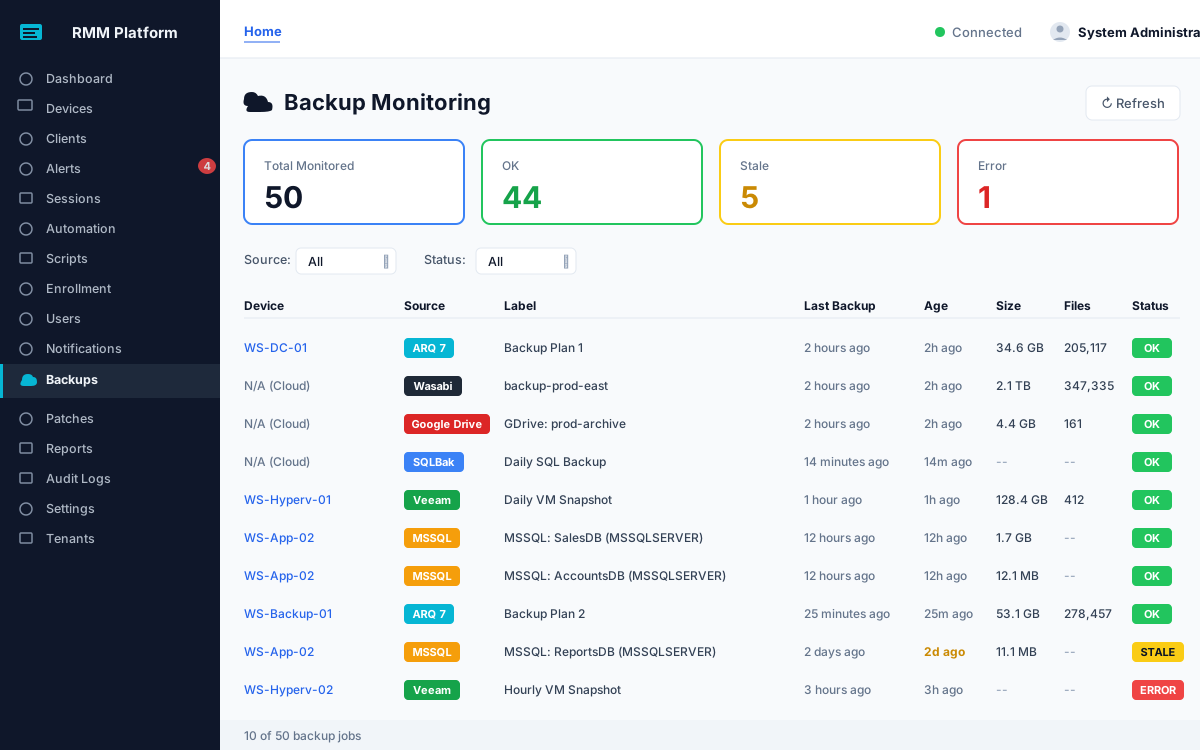
Backups fail quietly. Netaxis watches six different backup sources, normalizes them to one clear status, and flags anything stale or failing, then goes further on cloud archives by opening files to confirm they are not corrupt. One pane for the question that matters: are we protected?
Most teams run several backup products at once and check none of them consistently. Netaxis pulls them together and reports each in the same plain language — OK, stale, or error — so a problem stands out instead of hiding.
A green checkmark from a backup tool only means the job ran, not that the result is usable. For cloud archive backups, Netaxis inspects the files themselves: it watches for size anomalies, spots gaps in your retention history, and samples archives by opening them to confirm they are intact, catching silent corruption a status line would miss.
Archive files are checked against the size they should be, so a backup that silently shrank does not sail through as a success.
Gaps in the backup history are surfaced across the whole retention window, not just on the most recent run.
Archives are opened to verify they are actually readable, which is the only way to catch corruption that a success flag cannot see.
Integrity checks that read the archive itself, so a silent shrinkage does not surprise you on the day you need it.
Different clients and servers use different tools. Netaxis meets them where they are, with controls at the level that makes sense for each source.
A backup that simply stopped running is as dangerous as one that errored. Netaxis flags overdue jobs so silence never reads as safety.
On-device tools like Veeam, SQL Server and Arq report per machine. Cloud services like SQLBak, Wasabi and Google Drive are monitored per organisation.
Sources like Veeam and native SQL backups are controlled per device, so you monitor exactly what you intend to and nothing you don't.
Backup monitoring exists for one moment: the day you need to restore. Netaxis is built so that day is not the first time anyone checked. Consistent status across every tool, alerts the moment a job goes stale or fails, and integrity checks that open archive files rather than trusting a success flag. It feeds the same cyber-insurance and compliance reporting as the rest of the platform.
Directions in active development. Priorities, not dated promises.
Expanding the set of supported tools and cloud targets so more of your estate reports into the same single view.
Roll individual jobs up into a per-customer service-level view, so "are they protected?" has a single answer per client.
Extending the open-the-file verification approach to more archive formats and sources over time.
Book a live demo and we'll wire your real backup tools into one status view, and show you the integrity checks in action.